


Magic Body Editor
3.53.00 Reviews
App Specs
- Version
- 1.2.38
- Updated On
- License
- Free
- Downloads
- 100,000+
- Developer
- Ichime Global
- Categories
- Beauty
- Platform
- Android
Screenshots
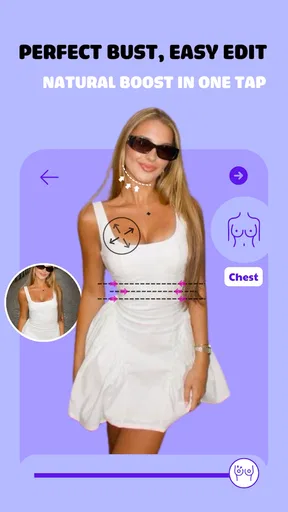
 Analysis by AppCompare
I judge a body-editing app less by how dramatic its transformations can be than by how well it handles one small change without making the whole photograph look artificial. That is the question I kept coming back to with Magic Body Editor: can I make a portrait feel a little more polished while keeping the person, pose, and setting believable? Its focus on reshaping makes that a useful test, especially for anyone who wants an occasional adjustment rather than a complicated desktop editing workflow.
Made by Ichime Global, this free beauty app has an average rating of 3.5 from around 200 ratings and has passed 100,000 installs. It is rated for everyone, though that broad age label does not change the fact that body-editing tools can affect how people feel about their appearance. I would treat the app as a creative editor, not as a standard for what a real body should look like. It includes in-app purchases ranging from $4.49 to $12.99 per item, so I would check which tools are available before building an editing routine around it.
Why body reshaping is the feature to judge first
The central appeal is straightforward: the app is built for changing how a body appears in a photograph. That can be handy when a camera angle, a stiff pose, or a loose garment produces a result that does not match how you remember the moment. A small adjustment may help a photo feel closer to your intention; a large one can quickly make the image feel less like a candid memory and more like a constructed picture.
That distinction matters more than the number of sliders or effects an editor might offer. Reshaping works on relationships between a person and the surrounding image. If a waistline moves, nearby clothing, a doorframe, a tiled wall, or another person may make the alteration obvious. I would therefore make the smallest change that solves the problem, then inspect the full image rather than judging only the area under my finger.
How I would use it without losing the original photo
For a practical edit, I would start with a copy of the photograph and decide what I want to improve before touching a control. “Make this picture feel more balanced” is a better target than changing several features at once. I would work gradually, pause to compare the edited result with the untouched image, and zoom out between adjustments. A close crop can hide a warped background that becomes obvious once the whole frame is visible.
Light and pose are worth checking before reshaping. A shirt caught in an awkward fold or a shoulder turned toward the camera can create an appearance that a body tool may not fix cleanly. In those cases, cropping or choosing another frame is often the more convincing solution. This is one of the useful trade-offs of a dedicated body editor: it can make direct adjustments accessible, but it cannot make every source photo a good candidate for them.
A realistic reason to reach for it
Imagine I have a group photo from a get-together that I want to share, but the camera was held low and the angle makes my posture look unusual. I could try a restrained correction, then check the people and straight lines near me for signs that the image has bent. If those details stop looking natural, I would undo the edit and use a different frame. The point is not to chase a perfect silhouette; it is to decide whether a modest change actually improves this particular picture.
Worth Reading Before You Choose

EA SPORTS FC Mobile 26 Is a Bigger Football Game, but It Takes Time

Flipboard Shows What News Apps Must Do Beyond the Feed

Switching to Android Auto Means Rethinking Your Driving Routine

Google Calendar Makes a Crowded Week Easier to Manage

Ludo King Makes the Most of the Minutes Between Plans

Baby Panda World Brings Quick Play to Modern Phones, but Its Game Library Feels Busy
This kind of use suits someone preparing a personal portrait, a profile image, or a casual social post who wants hands-on control over body appearance. It is less suited to someone who needs faithful documentary images, edits pictures for a professional record, or would rather leave people’s bodies untouched. If I am editing a photo that includes friends, I would also consider whether they are comfortable with changes before sharing the result.
What the surrounding tools add—and what they do not
Magic Body Editor is not limited to reshaping. Its face-editing options and appearance adjustments give users ways to work on a portrait beyond the body, while background changes and visual effects can alter the image’s overall presentation. That breadth may be convenient when I want to make a few kinds of edits in one place. It can also tempt me to keep adding changes after the main problem is solved, so I would treat each extra effect as a separate decision rather than applying everything by default.
Compared with a general photo editor, this app’s appeal is its emphasis on body and appearance changes rather than relying only on broad adjustments such as color or cropping. A general editor may be the better choice when the real issue is exposure, composition, or tone; those problems do not call for reshaping. A retouching-focused alternative may suit someone who wants a more controlled portrait workflow, while a simpler editor is easier to recommend to a person who only needs an occasional crop or filter. The right choice depends on the job, not on how many tools are available.
Trying the app with realistic expectations
I’d use this section to set a sensible goal before opening the editor: decide what feels off in the photo and whether a small body adjustment could genuinely help. I also think it’s worth choosing an image with clear space around the subject, since nearby edges and other people make subtle changes easier to spot. That gives the next section a practical starting point: how to approach an edit without letting it take over the picture.
Getting Started with Magic Body Editor
Let’s dive right in. First impressions matter, and Magic Body Editor doesn’t disappoint. The app is a breeze to download and set up on both Android and iOS. Once you’re in, you’re greeted with a sleek, user-friendly interface that makes navigation feel like a walk in the park.
The home screen is intuitively designed, with all the tools laid out clearly. Whether you’re a newbie to photo editing or a seasoned pro, you’ll find it easy to find your way around. The app’s setup ensures you spend less time fumbling around and more time making magic happen.
The Features You’ll Love
Now, onto the good stuff! The feature set is where Magic Body Editor truly shines. This isn’t just another run-of-the-mill editing app. It’s packed with a variety of tools designed to enhance your photos with a professional touch.
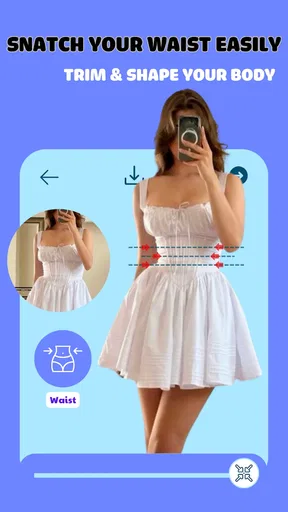
First up, the body reshaping feature. It’s perfect for tweaking those little details you wish were just a tad different. Want a slimmer waist or broader shoulders? You got it. The app uses advanced algorithms to ensure adjustments look natural and subtle, so you’re not left with bizarre, distorted results.
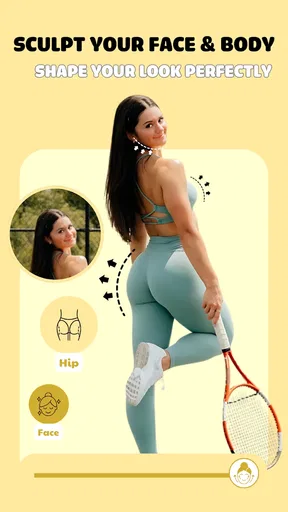
The face editor is another highlight. From smoothing out skin tones to adjusting facial features, it offers a comprehensive suite of options. The magic doesn’t stop there; the app includes a hair color changer, eye color adjustments, and even teeth whitening. It’s like having a mini photoshop studio in your pocket!
Usability and Performance
When it comes to performance, Magic Body Editor holds its own. The app runs smoothly, with minimal lag even when working on high-resolution images. This is a huge plus for anyone who’s had to deal with sluggish apps in the past.
One of the standout elements is the real-time preview feature. As you make edits, you can see the changes instantly, which is incredibly helpful. No more endless trial and error to get that perfect look. This feature alone saves so much time and frustration.
Exploring the Advanced Tools
For those who love a bit of extra flair, the app doesn’t disappoint. The background editor is a nifty tool, allowing you to change backgrounds with ease. Whether you’re looking to add a pop of color, or transport yourself to a dreamy landscape, the possibilities are endless.
The app also includes a set of filters and effects that can give your photos a unique touch. From vintage vibes to modern aesthetics, there’s something for everyone. It’s like having a professional stylist for your photos, which is pretty cool if you ask me.
Choosing an edit that still feels like you
The live preview is useful, but I would not treat the first version I see on screen as the finished image. A practical habit is to make one change, look away for a moment, then return to the full photo. That short pause helps me notice when an edit has become more noticeable than the original issue. I would also keep an unedited copy so I can compare later or start over without trying to reverse a chain of changes from memory.
There is a social side to this choice, too. A heavily altered portrait can create expectations that do not match how someone looks in person, especially when used as a profile picture. For a private creative experiment, that may not matter. For a work profile or a photo meant to represent me accurately, I would favor lighting, framing, and color corrections over reshaping. The app is most useful when I choose the purpose first and let that limit the edit.
Version, access, and deciding whether it fits
The current version is 1.2.38, and the app requires Android 7.0 or later. It is free to install, with individual in-app purchases priced from $4.49 to $12.99. I would try the available editing flow before paying for anything and make sure the specific adjustments I want are accessible in the version I am using. That is a more sensible approach than assuming every tool is included simply because the app itself costs nothing to download.
The app was released on February 18, 2025, and its modest average rating suggests that experiences are not uniformly enthusiastic. I would read that as a reason to approach it with a clear, limited test: pick one suitable portrait, try a subtle edit, and see whether the controls and result match my expectations. The app’s broad set of appearance tools may be a plus for casual experimentation, but someone who values dependable, natural-looking retouching above all else should compare results with a conventional editor before committing to a particular workflow.
It is also worth thinking about the image itself before editing. A busy background, a person close to the edge of the frame, or overlapping arms and clothing can make changes harder to judge. I would choose a photo with enough space around the subject, save a separate version, and inspect the edges after each adjustment. That small preparation can prevent an edit from looking tidy in a close-up but strange in the full composition.
For someone asking whether this is a good first editor, my answer is: it can be, if the goal is a quick portrait adjustment and the person is willing to use a light touch. A beginner does not need to master a complex desktop program to try a modest change. But if the goal is precise image work, consistent results across a batch of photos, or corrections that preserve an accurate record, I would choose a more general or professional editing tool instead. Convenience and control are not always the same thing.
Final Thoughts
At the end of the day, Magic Body Editor is a must-try for anyone interested in photo editing. Its range of powerful, easy-to-use tools set it apart from many other apps on the market. Whether you’re looking to make subtle tweaks or drastic changes, it’s got you covered.
If you’re curious and want to give it a whirl, you can find the download links right here on our website. Trust me, once you start experimenting with this app, you’ll find it hard to stop. So, go ahead, unleash your creativity and take your photos to the next level!
My recommendation
I would recommend it to people who specifically want accessible body and face adjustments, enjoy experimenting with portraits, and are prepared to judge each result with care. The strongest reason to try it is that its focus makes this kind of edit easy to explore without turning a small task into a full editing project. The strongest reason to pass is equally simple: if you want your pictures to remain strictly true to life, or only need basic cropping and color correction, reshaping is unnecessary and a general photo editor is a better fit.
My practical advice is to begin with one photo, one modest change, and a clear stopping point. Check the whole frame, keep the original, and decide whether the finished picture still feels like the moment you wanted to share. Used that way, the app can be a handy creative option; used without restraint, its body-focused tools can make a natural image feel less convincing rather than more polished.
Pros
- Intuitive interface for easy editing.
- Wide range of customization options.
- High-quality output resolution.
- Supports various image formats.
- Quick processing time for edits.
Cons
- Contains ads that may disrupt workflow.
- Limited free features without upgrade.
- Occasional glitches on older devices.
- Requires internet for full functionality.
- No direct social media integration.
FAQs for Magic Body Editor
What is Magic Body Editor used for?
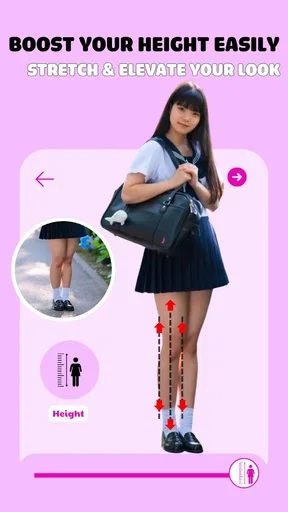
Magic Body Editor is a photo editing app designed to enhance body features and aesthetics. Users can reshape body parts, adjust height, and refine facial details with intuitive tools. It's popular among those looking to improve their photos for social media or personal use without needing advanced editing skills.
Is Magic Body Editor free to use?
Magic Body Editor offers a free version with basic features. However, to access advanced tools and remove ads, users may need to purchase a subscription. This provides a more seamless experience and additional editing capabilities, making it ideal for those who frequently edit photos.
How user-friendly is Magic Body Editor for beginners?
Magic Body Editor is designed with an intuitive interface that’s suitable for beginners. It includes guided tutorials and simple controls that let users quickly learn how to enhance their photos. Even those with little to no editing experience can easily navigate the app and achieve professional-looking results.
Can Magic Body Editor alter facial features realistically?
Yes, Magic Body Editor is equipped with advanced face editing tools that allow users to make realistic alterations to facial features. These tools include options to smooth skin, adjust facial symmetry, and enhance features subtly. The aim is to maintain a natural look while achieving the desired enhancements.
What privacy measures does Magic Body Editor have in place?
Magic Body Editor takes user privacy seriously, implementing measures to protect personal data. Photos edited in the app are not stored on their servers, ensuring user images remain private. It's advisable to review the app’s privacy policy to understand how data is handled and what permissions are required.


